The official launch of Drupal 11 in August 2024 marked an important turning point in the history of the open source CMS. With a modernized architecture, enhanced performance and simplified administration, this new version offers organizations an ideal foundation for designing digital platforms that are powerful, scalable and sustainable.
Why this major new version?
Since Drupal 10, Drupal has released a new major version every two years, in even-numbered years (2024, 2026, etc.).
The update cycle now follows that of Symfony: minor versions of the core (10.3, 10.4, etc.) are released every six months or so, while patches and security updates (10.3.2, 10.4.1, etc.) are released monthly for the core and contributing modules.
Each major version benefits from active support for two years, followed by a further two years of maintenance and security, until two new major versions are released.
A first version of Drupal 12 has already been announced for the beginning of the 2nd half of 2026.
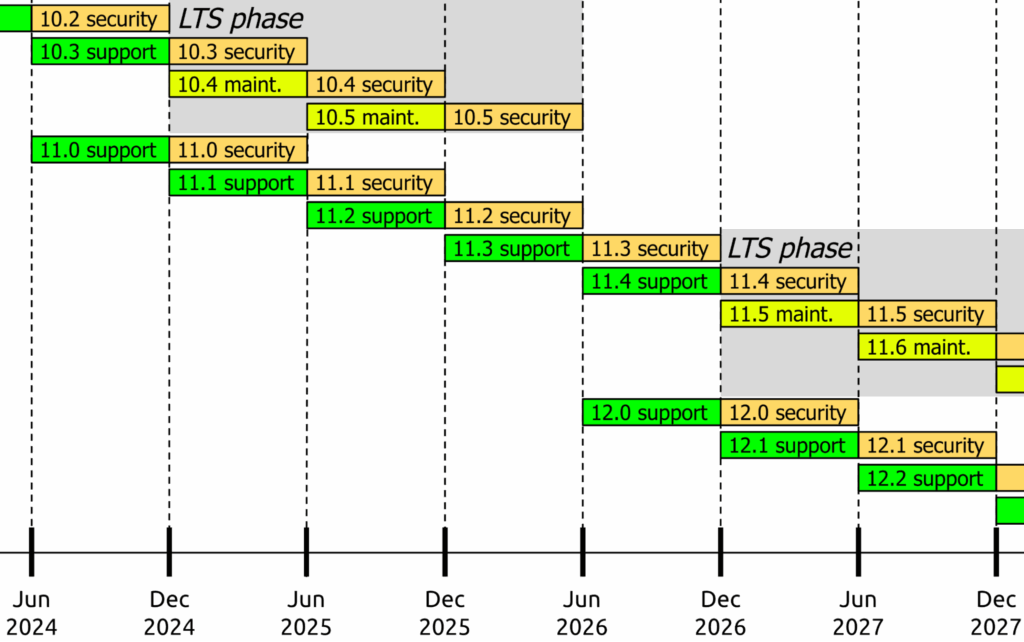
Source : Drupal.org
A reinforced technical base for enhanced performance
Dependency updates
- Move to Symfony 7 for the core, with a modernized routing and event system that improves code performance and maintainability.
- Update jQuery and other front-end libraries.
Minimum PHP version
- Drupal 11 requires PHP 8.3 as a minimum version, to take advantage of the latest language features (stricter types, performance, security).
Cleaning up deprecated code
- All code marked as “deprecated” in the latest versions of Drupal 10 has been removed from the core.
- This clean-up makes the APIs more coherent and prepares a more stable foundation for future CMS developments.
Major structural innovations
Back-office modernization
- Navigation
- New Navigation module with fold-out vertical menu and clearer labels.
- Faster display of the classic admin bar.
- Content management
- Stabilized Workspaces module: allows you to prepare, preview and publish batches of content/configurations from simulated environments, improving collaboration and deployment security.
- Custom blocks with refined revisions and permissions.
- Permissions and safety
- Tools admin
Single Directory Components (SDC)
- A new approach to structuring front-end components: HTML, CSS, JS and YML metadata are grouped together in a single directory.
- Facilitates modularity, reuse and maintainability of front-end code.
     Exemple d’arborescence SDC :
     my_theme/
       components/
         bouton-cta/
           bouton-cta.html.twig
           bouton-cta.css
           bouton-cta.js
           bouton-cta.component.yml
Recipes (ready-to-use configuration kits)
- Recipes are a new system for automatically installing and configuring complete functionalities (blogs, events, etc.) with a single CLI command (drush recipe).
- Speeds up site creation and standardizes development environments.
WebP media and image management
- New media library with clearer navigation
- Optimized file support
- Automatic transliteration of file names
- Improved native support for WebP image format via image styles, with automatic generation of WebP derivatives (25-35% reduction in size) and intelligent fallback to JPG/PNG.
Publication workflow for taxonomies
- Content Moderation Workflow now extends to taxonomy, offering drafts, published/unpublished status, revisions, and fine-grained rights management.
Strengthening native APIs
- Decoupled menus (Linkset)
- New JSON:API Linkset endpoints expose complete menus (structure + links) for React/Vue/Native frontends, without complex backend development. Direct access via
/jsonapi/linkset/menu/main.
- New JSON:API Linkset endpoints expose complete menus (structure + links) for React/Vue/Native frontends, without complex backend development. Direct access via
- JSON:Extended API
- Enhanced REST/GraphQL
Improved cache system
Drupal 11 introduces significant improvements to the caching system to boost overall performance.
These optimizations drastically reduce database queries and cache operations.
- Key optimizations
- The rendering and cache layers now merge database and cache activities, optimizing the loading of path aliases and entities.
- Practical benefits
- Page Cache and Dynamic Page Cache are enhanced for more flexible and dynamic caching, minimizing redundant calls and better supporting high-traffic environments. BigPipe integrates HTMX for lighter JavaScript and more efficient hot caching.
- Development tools
- A Twig development mode and a “Do Not Cache Markup” option facilitate debugging without constant cache flushing.
Guide to migrating from Drupal 10 to Drupal 11
The migration of Drupal 10 sites to Drupal 11 was often delayed because many of the modules contributed were not yet Drupal 11 compatible.
Today, the majority of contrib modules are Drupal 11 compatible, and support for Drupal 10 is planned for the end of the year. So it’s time to migrate .
The procedure for migrating from Drupal 10 to Drupal 11 is virtually identical to the procedure for migrating from Drupal 9 to Drupal 10 described in our article Migrating from Drupal 9 to Drupal 10.
Here’s how it works:
Step 1: Preparation
Before you start migrating, make sure your site is up to date with the latest version of Drupal 10. This will ensure that you have all the security and functionality updates you need before upgrading to Drupal 11.
Make a full backup of your Drupal 10 website. This includes the database, configuration files, media files and all content. In the event of a problem, you’ll always be able to go back.
Step 2: Install the Drupal upgrade_status module
The upgrade_status module is a verification tool that helps you identify compatibility problems during migration.
You can install it using Composer:composer require drupal/upgrade_status
After installing the module, activate it in the extensions.
Step 3: Run the upgrade_status analysis tool
After activating the upgrade_status module, go to /admin/reports/upgrade-status. There you’ll find a detailed report indicating the problems that need to be corrected before you can perform the Drupal 11 upgrade.
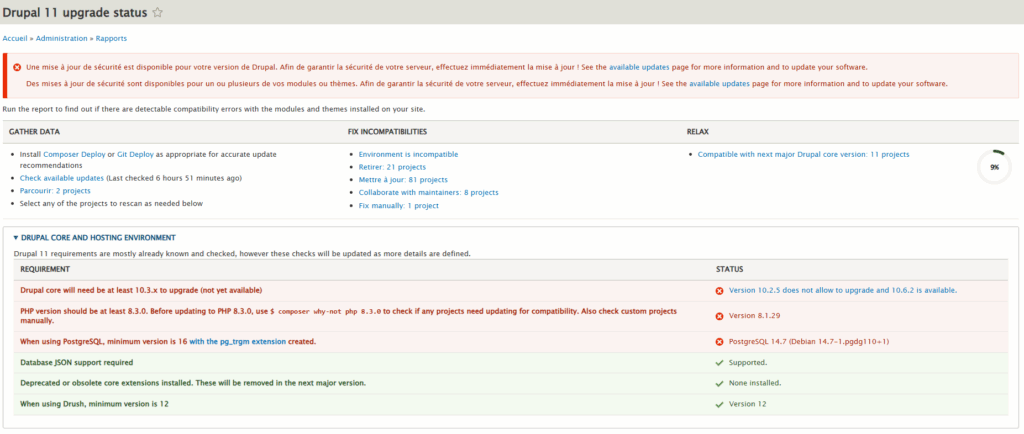
In this report you will find :
- Environmental prerequisites
- List of modules that are not activated and can therefore be removed from the site
- The list of contrib modules for which there is currently no update compatible with Drupal 11
- List of contrib modules to be updated to ensure compatibility with Drupal 11
- List of modules or custom themes to be scanned for compatibility issues that need to be corrected
- List of contrib modules currently compatible with Drupal 11
In short, at this stage you’ll have a clear picture of the work required to complete the migration.
Step 4: Update development, acceptance and production environments
Environment requirements for Drupal 11
Web server
Apache 2.4.7 or higher, Nginx 1.1 or higher, or any other Web server supporting PHP.
Database
MySQL 8 or higher
MariaDB 10.6 or higher
Percona Server 8.0 or higher
PostgreSQL 16 or higher
SQLite 3.45 or higher
Memory
Memory requirements RAM: the minimum memory requirement is 1 GB to ensure that Composer runs smoothly. If you run several modules or use memory-hungry tools such as Solr or Memcache, much more memory may be required.
PHP
PHP version: PHP 8.3.
PHP extensions required: PDO, XML, GD, OpenSSL, JSON, cURL, Mbstring and zlib.
Step 5: Solve the problem
Carefully examine the report generated by upgrade_status and resolve all the problems detected. This may involve removing or updating certain modules, replacing obsolete modules with alternatives, or rewriting custom code that is no longer compatible with Drupal 11.
Step 6: Upgrade Drupal to version 11
Once you’ve solved all your problems, you can upgrade to Drupal 11 using the compose and drush commands.
# Mise à jour de drush vers la version 13
composer require drush/drush^13

# Mise à niveau du core seulement dans composer.json
composer require 'drupal/core-recommended:^11' 'drupal/core-composer-scaffold:^11' 'drupal/core-project-message:^11' --update-with-dependencies --no-update

# Simulation pour détecter des conflits
composer update --dry-run

# Résoudre les éventuels conflits
composer why-not drupal/core-recommended 11.0

# Mise à jour effective
composer update --with-all-dependencies

# Mise à jour de la base
drush updb

# Vider les caches
drush cr
Step 7: Repeat the analysis with upgrade_status
Go to the upgrade_status module page and run a new analysis to make sure there are no more compatibility problems after migration to Drupal 11.
Step 8: Test your site
After upgrading to Drupal 11, perform thorough tests to make sure everything is working properly. Be sure to check that all your site’s modules and functionalities are working properly.
Lùkla support on Drupal
Do you have any questions about this article?
Would you like us to help you with your Drupal 11 project or your Drupal 11 migration process?
The Lukla teams are at your disposal. We look forward to hearing from you!